Hooq help centre

What to expect
This page explains what Hooq copies, what it leaves alone, how quickly it works and which limits apply.
What syncs
- Work items of matched work types. A new work item creates a copy in the other project. Changes to mapped fields update the copy. Only the fields you mapped are copied; a change to any other field is ignored.
- Parent. When a work item gets a new Parent or is created under one, and that parent is synced in the same Hooq, the Parent of the copy follows. It works inside one Hooq only, a removed Parent is not cleared on the copy, and a field mapping to Parent replaces it. See Fields and values.
- Statuses. Hooq moves the copy through the statuses you matched in the Workflows tab. If several quick status changes happen, the copy ends on the final status.
- Comments. A copied comment starts with an italic line that says who wrote it and where it came from, followed by the comment. Images and files shown inside a comment appear in the copied comment exactly as in the original.
- Descriptions with inline images and files. Images and files shown inside a description appear in the copy in the same place as in the original. This works within one instance and between two instances.
- Attachments. New files attached to a work item are copied to the other work item (see Limits).
- Worklogs. When the Worklogs tab is on, a new worklog is copied. An edit of a worklog is not synced, and a restricted worklog stays restricted (or is not copied). The copy is logged by Hooq.
- Deleted comments. With Prevent Comment Deletion off in the Advanced tab, deleting an original comment deletes its copy. See Comments.
- Clearing a description. If you clear the description of the original, the description of the copy is cleared as well.
What does not sync
- Unmatched work types and statuses. A work item whose work type has no match is not synced. A status with no match does not move the copy.
- Fields you did not map.
- Work items that existed before the start. Starting a Hooq does not copy them unless you limit the Hooq with a JQL filter in the Work Types tab. Resync only updates work items that already have a copy.
- Deletions of work items. Hooq never deletes the copy. When a work item of a pair is deleted or changes its work type, the other one stays, and its panel says the pair is no longer Hooqed.
- Assignee set to Hooq. Hooq never makes itself the assignee. If it cannot find a matching person on the other instance, it leaves the assignee unchanged.
Dashboard gadget
The Hooq dashboard gadget shows Linked pairs recorded by Hooq. The numbers come from the links Hooq stores and the last status it synced; they are not a live Jira search. Pairs where Hooq saw a work item being deleted are left out.
- The scope is All Hooqs or one Hooq. Clear returns to All Hooqs.
- The Hooq you save stays selected after you reload the page, and the settings form shows the saved values.
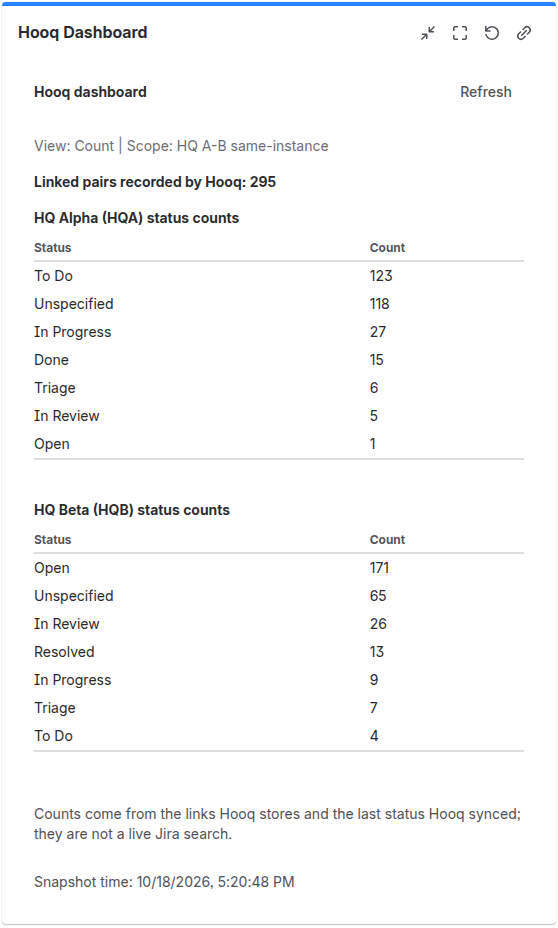
The Hooq Dashboard gadget for one Hooq: how many pairs are linked, the work items per status in each project, and when the numbers were taken.
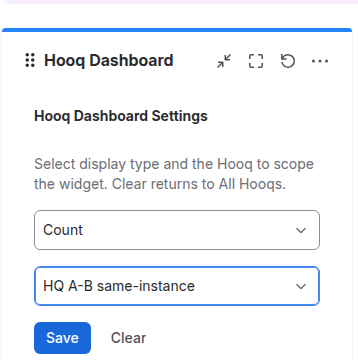
The gadget settings: choose the display type and the Hooq, then select Save. Clear goes back to All Hooqs.
Timing
- Syncing is event driven: Hooq reacts when a work item changes. Most changes arrive within seconds.
- Under heavy load Jira and Forge limit how fast apps can work, so a change can be delayed for a short time.
- After you publish, start or stop a Hooq, the header can show the old state for a short while. Reload the page to see the current state.
- The panel on a work item refreshes about every 30 seconds. If the panel cannot load, it shows an error text and tries again later, waiting longer after repeated failures.
When two people edit
- If a person edits the description of the copy within about 2 seconds after the original was edited, the person's edit is kept.
- If a person edits the copy right after a Resync, their edit is kept and the older text from the original does not replace it.
- If a person edited the copy a short time before an older change from the original arrives, the person's text is kept and is not overwritten by that older text.
Limits
| Limit | Value |
|---|---|
| File size between two different instances | About 3.5 MB per file. This comes from Forge platform limits and cannot be changed. A larger file is not copied and an error appears in the Troubleshooting tab. |
| File size on the same instance | Hooq sets no limit. |
| Connectors per partner instance | One. Hooq refuses a second connector for an instance that already has one. |
| Unfinished connectors (Drafts) | Up to 5 per instance. Delete the ones you do not need. |
| Pairing files (public key file, connector file) | Under 16 KB each, plain text. A connector file is valid for 5 minutes. |
| Same file sent both ways | If a file with the same name and the same size is sent in both directions within about 10 minutes, the second copy can be skipped. |
By design
- Both instances of a Hooq between two different instances must run the current version of Hooq. Instances on different versions are not supported.
- Deleting a connector removes it on the partner instance as well. Hooqs rely on their connector to reach the partner instance, so delete a connector that is in use only on purpose.
- Only Jira administrators can use the Hooq page and its actions. Every user can use the panel on a work item (Resync, comment, attachment). The Hooq dashboard gadget shows data to Jira administrators only for now; other users see Hooq dashboard data is available to Jira administrators.
- A Hooq only works while it is running and its configuration is published.
- Internal (agent-only) comments of service projects are not copied unless you turn that on in the Comments tab.
- Deleting an attachment on one side does not delete it on the other side while Prevent Attachment Deletion in the Advanced tab is on. The same is true for a comment while Prevent Comment Deletion is on (the default). With it off, deleting an original comment deletes its copy; deleting a copy never deletes the original.
- Hooq does not add Jira issue links between the two work items. The Hooqed With row in the panel shows the partner.
- Pairs that you link with Manual Link sync only changes made after the link. Older comments, files and worklogs are not copied, and a Resync does not send the old history. See Manual Link.
Related pages
Want to raise a ticket? Click here (opens in a new tab)