Hooq help centre

Comments
The Comments tab controls whether comments are copied, in which direction, and how the copy looks.
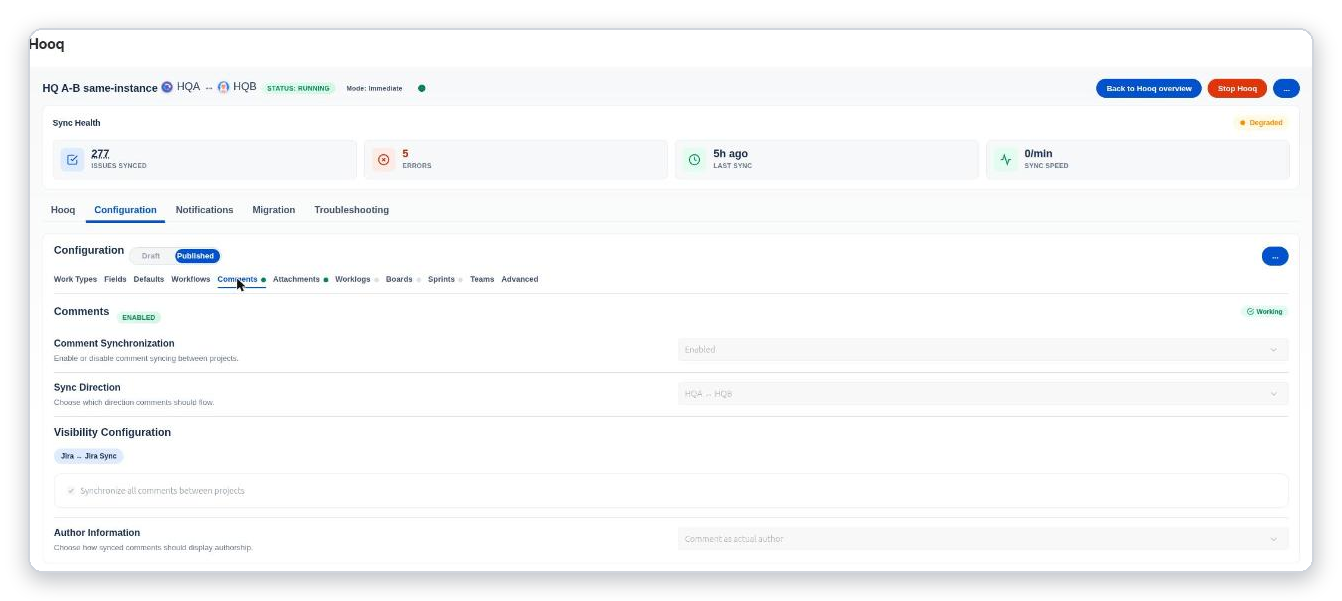
The Comments tab. A green label at the top right shows that comment sync is working.
Settings
| Setting | What it does |
|---|---|
| Comment Synchronization | Enabled or Disabled. When disabled, no comments are copied. |
| Sync Direction | Which way comments flow: both ways, or from one project to the other. |
| Visibility Configuration | For two Jira projects: Synchronize all comments between projects. For service projects it shows more choices, see below. |
| Author Information | Comment as actual author: the copy starts with an italic line that says who wrote the original, on which work item and when, followed by the comment. Comment as Hooq: the copy is the plain comment, without that line. In both cases the copy is posted by Hooq, not by the person who wrote the original. The tab shows the choice that is saved. Good to know: with Comment as Hooq, a comment sent from the issue panel also arrives without the author line. |
Comments between two instances
A comment written while the other instance is briefly slow, or when the first send times out, is no longer lost: Hooq’s automatic retry now sends it again.
Service projects
If one of the projects is a Jira Service Management project, the tab lets you choose what to do with internal (agent-only) and public (customer-visible) comments:
- Sync Internal Comments (Agent-only comments) and Sync Public Comments (Customer-visible comments) for comments leaving a project.
- Received Internal comments as and Received Public comments as: Internal (Agent only), Public (Customer visible) or Ignore (Don't sync).
Images and files shown inside a comment appear in the copied comment exactly as in the original.
Deleted comments
What happens to the copy when someone deletes a comment depends on Prevent Comment Deletion in the Advanced tab.
- On (the default): the copy stays when the original comment is deleted.
- Off: when the original comment is deleted, Hooq deletes its copy. This works on one instance and between two instances, in both directions. In our tests the copy was gone within a minute.
- Deleting a copy never deletes the original.
Related pages
Want to raise a ticket? Click here (opens in a new tab)