Hooq help centre

Boards
The Boards tab can copy Jira Software boards between the two sides: a board created in a mapped project gets a partner board, and a deleted board can delete its partner. It is off until you switch it on.
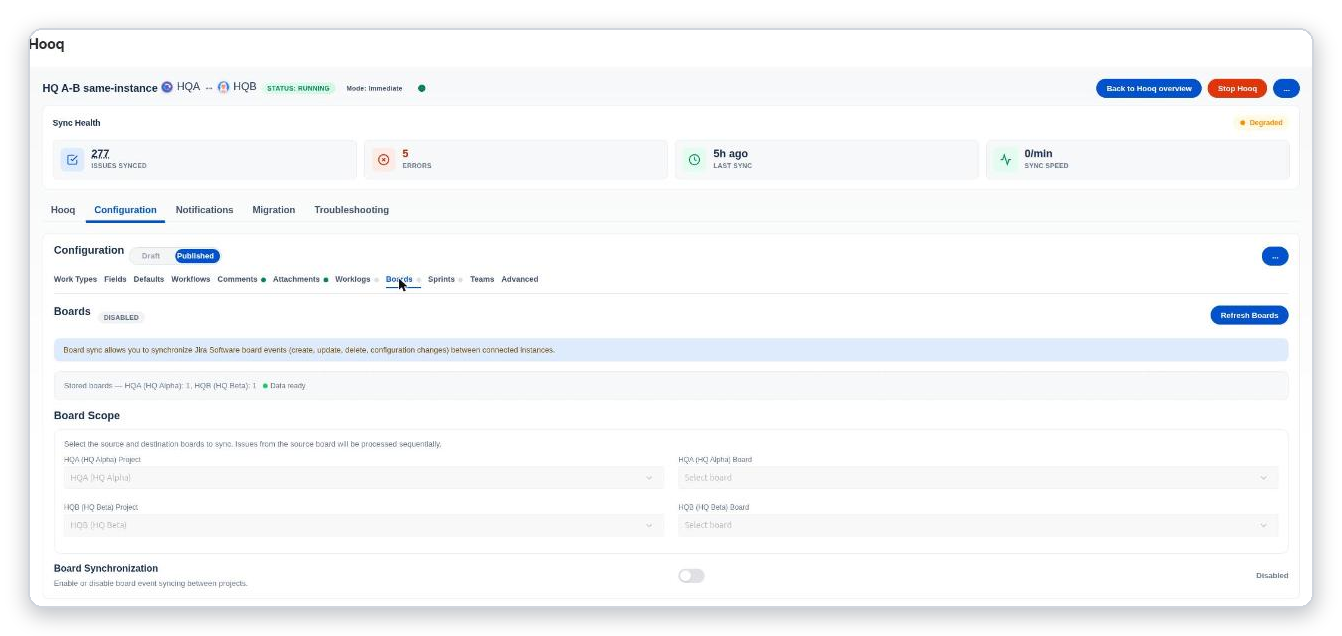
The Boards tab: the scope (which boards) and the Board Synchronization switch.
- Refresh Boards reads the boards of both projects again. The line under the banner says how many boards are stored for each project.
- Board Scope: choose the project and the board on each side.
- Board Synchronization: the switch turns board syncing on or off.
- Prevent Board Deletion in the Advanced tab: on (the default), a board deleted on one side keeps its partner board; off, deleting a board also deletes its partner board.
Boards are mirrored, not cloned: the other side gets a board of the same type and name that shows the work items of its project. Columns and the filter of the original board are not copied.
- Good to know: renaming a board is not synced, because Jira’s API cannot rename a board.
- The event choices Board Updated and Configuration Changed only create the partner board if it is missing. They do not sync columns, filters or settings.
- A board deleted on one instance is not deleted on the other instance: the delete is not forwarded between instances.
- Refresh Boards and the filter dropdown list only the boards and filters whose Jira filter the Hooq app can see. A board with a private filter appears only after you share its filter with the project.
Related pages
Want to raise a ticket? Click here (opens in a new tab)