Hooq help centre

How to find out why a work item did not sync
Goal
Find the reason when a work item or a change did not arrive.
Before you start
- You know the key of the work item.
Steps
Open the work item and read the Hooq - Work Sync Panel. This issue is not Hooqed means the work item is not part of the Hooq (for example its work type is not matched).
Check the Hooq: is it Running and Published? See Publish and start.
Open the Hooq and select the Troubleshooting tab. Select Search to refresh the list and look for the work item key.
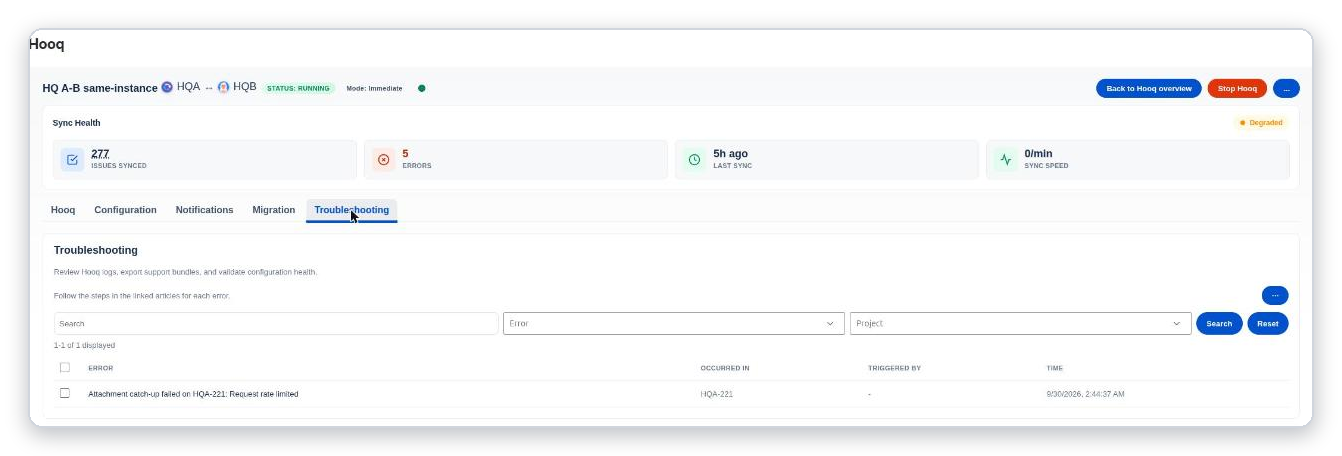
The Troubleshooting tab lists recent errors with the work item they occurred in.
Find the entry in Troubleshooting and follow its fix.
After the fix, select Resync in the panel to send the work item again.
Expected result
You know the cause, and after Resync the copy is up to date.
Common mistakes
- Looking for warnings in the Troubleshooting tab: it lists errors only.
- Resyncing before the cause is fixed.
Related pages
Want to raise a ticket? Click here (opens in a new tab)