Hooq help centre

The Hooq tab and the header
When you open a Hooq, the top of the page is the same on every tab. It shows what the Hooq is doing and gives you the main buttons.
The header
- The name of the Hooq, its two projects, and its status: for example Running or Stopped.
- Mode: Immediate: configuration changes can be published without a review step.
- Back to Hooq overview, Start Hooq or Stop Hooq, and the ... menu.
Sync Health
Four numbers describe how the Hooq is doing: Issues synced, Errors, Last sync and Sync speed (changes per minute). A label at the right, such as Degraded, summarises the state. Reset it with Reset sync health from the ... menu once you have dealt with the errors.
The ... menu
| Menu item | What it does |
|---|---|
| Resync | Opens the Resync work items window. See Resync. |
| Download Hooq work items | Downloads a CSV file with the work items of this Hooq and tells you how many were downloaded. |
| Reset sync health | Resets the Sync Health numbers. New activity updates them again. |
| Documentation | Opens this help centre. Jira first asks you to confirm that you are opening an external page; select Continue. |
| Create support ZIP | Creates a file you can send to support. Check it before you send it. |
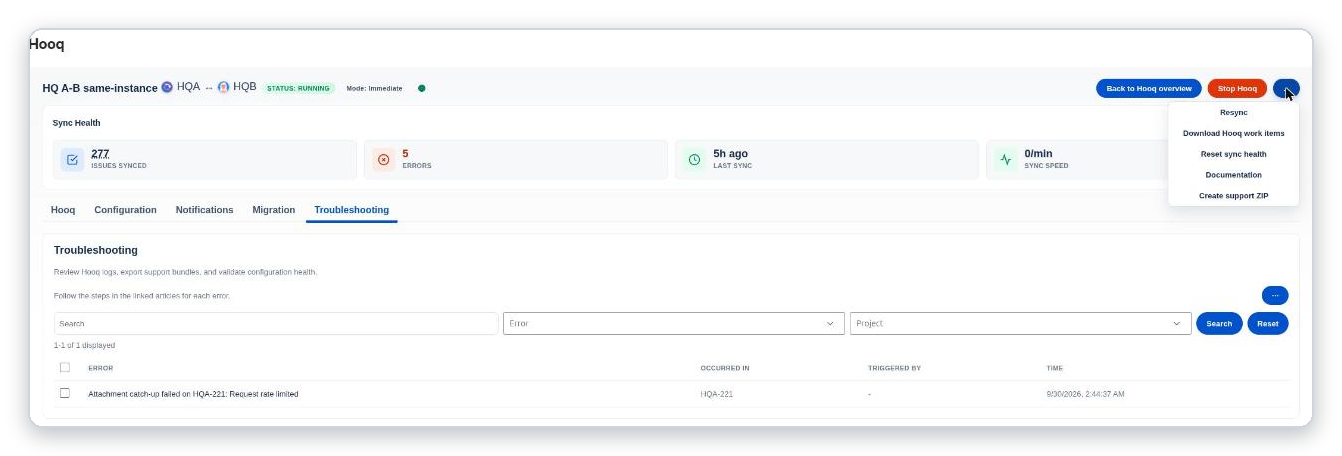
The ... menu in the header of a Hooq.
The Hooq tab
The first tab checks that the pairing, the permissions and the sign-in state are fine. It shows both projects with their project keys, and a Refresh Project Details button. Select that button after you change something in a project (for example a new field), so that Hooq reads the project again.
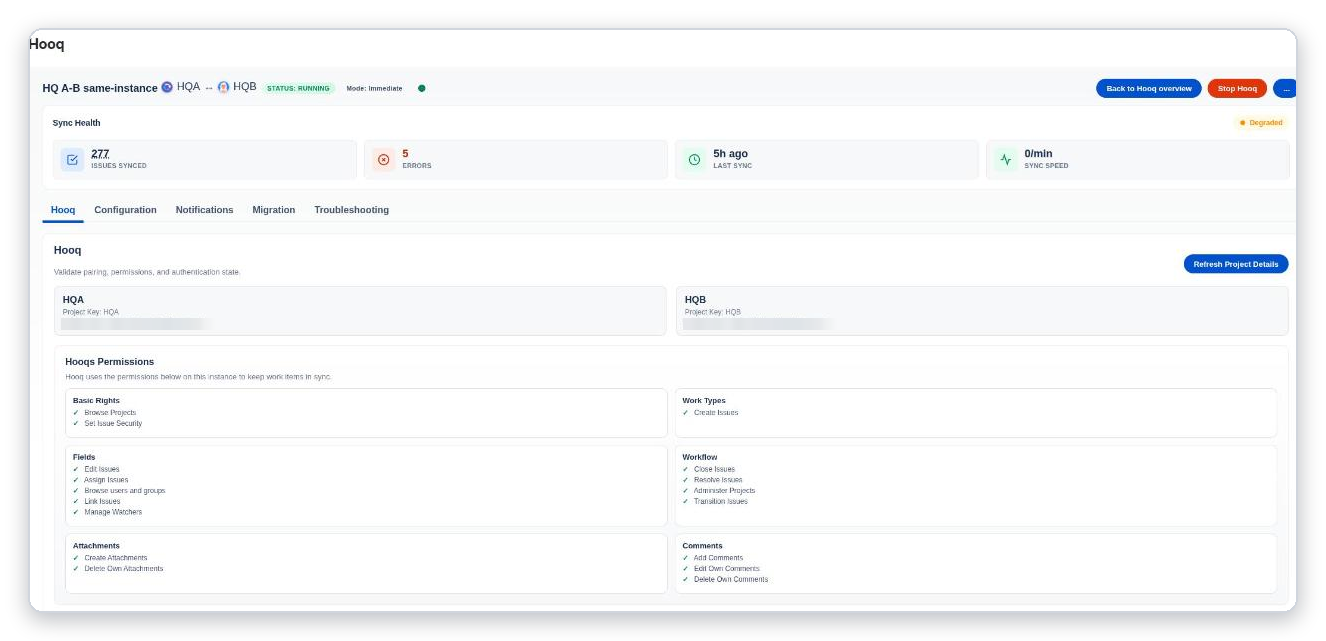
The Hooq tab. The project addresses are blurred in this picture.
Hooqs Permissions
Hooq lists the Jira permissions it needs on this instance, in six groups. A green tick means the permission is in place.
| Group | Permissions |
|---|---|
| Basic Rights | Browse Projects, Set Issue Security |
| Work Types | Create Issues |
| Fields | Edit Issues, Assign Issues, Browse users and groups, Link Issues, Manage Watchers |
| Workflow | Close Issues, Resolve Issues, Administer Projects, Transition Issues |
| Attachments | Create Attachments, Delete Own Attachments |
| Comments | Add Comments, Edit Own Comments, Delete Own Comments |
The five tabs
| Tab | Use it to |
|---|---|
| Hooq | Check the pairing and permissions. |
| Configuration | Set up what is synced. See Set up a Hooq. |
| Notifications | Choose who is told about failures. See Notifications. |
| Manual Link | Link pairs that another sync app already made. See Manual Link. |
| Troubleshooting | Review errors. See Troubleshooting. |
Related pages
Want to raise a ticket? Click here (opens in a new tab)