Hooq help centre

Defaults
The Defaults tab sets a value that Hooq uses for a field of the copy when the value for the destination is empty.
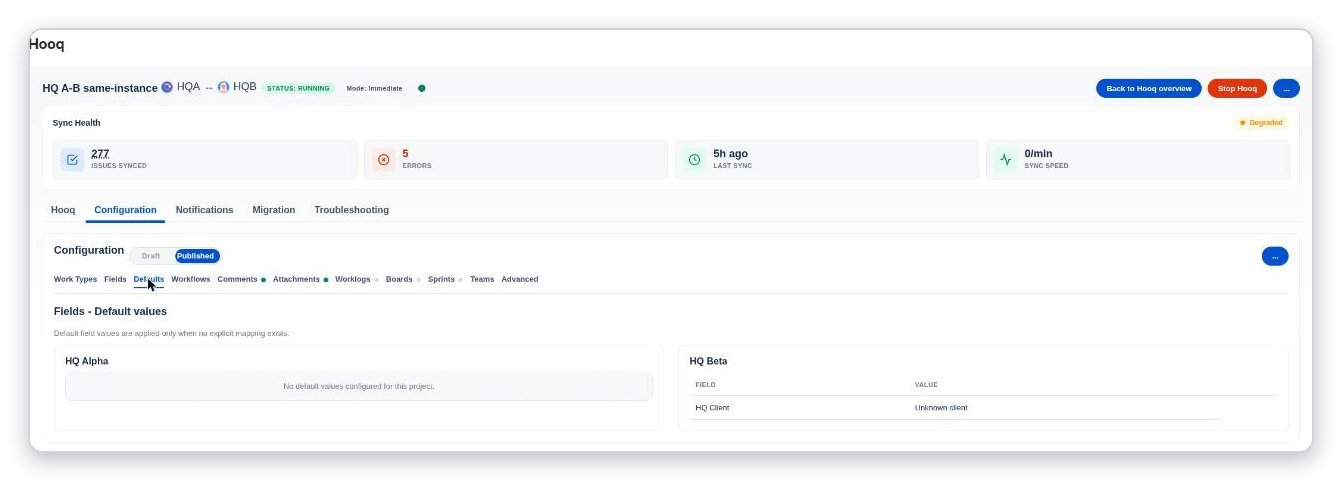
The Defaults tab: each project lists its default values as Field and Value.
Each project has its own list. A project with no defaults says No default values configured for this project. In the demo, the field HQ Client of project B gets the value Unknown client when a copy is created and nothing else fills it.
How defaults behave
- A default is used when the value for the destination is empty. A mapped field that has a value keeps it (see the Fields tab). A default never stops a copy from being made.
- A default for a field that is not on the create screen of the project that receives the copy is skipped, and the copy is created without it. Hooq writes a warning in its log; the warning is not listed in the Troubleshooting tab. To use such a default, add the field to the create screen of that project.
Related pages
Want to raise a ticket? Click here (opens in a new tab)