Hooq help centre

Fields and values
The Fields tab decides which fields are copied. Hooq copies only the fields you map here; a change to any other field is ignored.
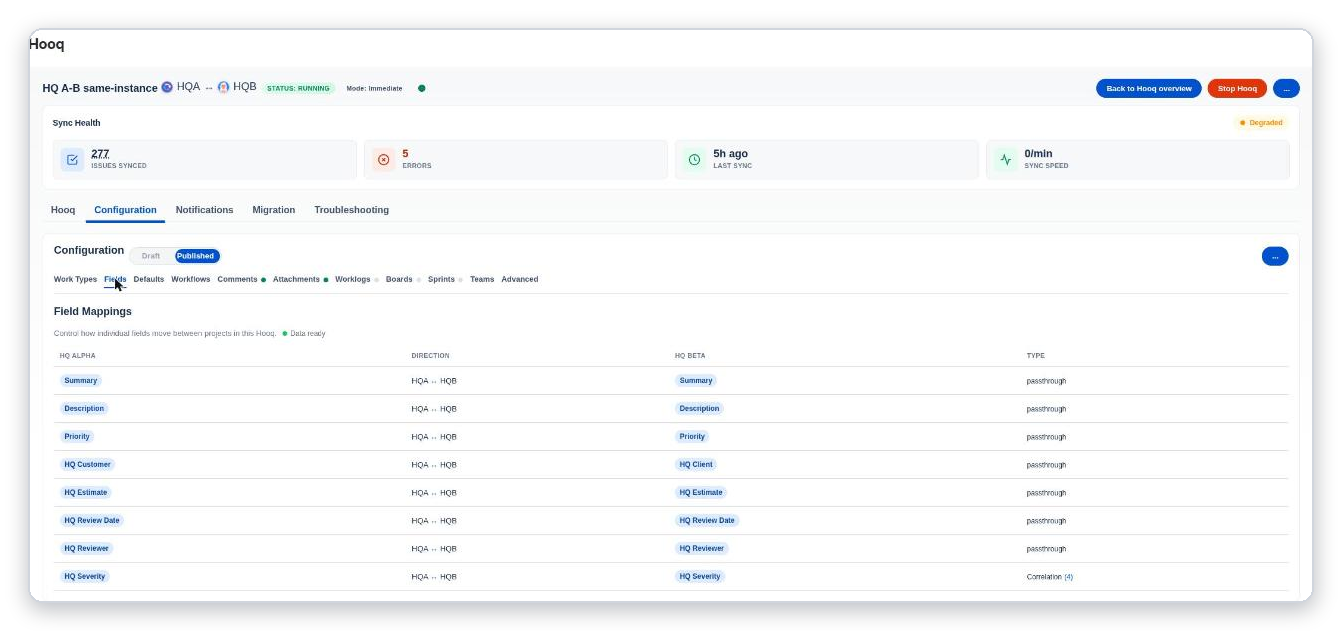
The Fields tab: one row per mapped field.
The table
| Column | Meaning |
|---|---|
| Project A and project B columns | The two fields that are matched, for example Summary and Summary. |
| Direction | Which way the value travels. In the demo, all rows go both ways. |
| Type | passthrough copies the value as it is. Correlation matches the values of the two fields one by one, for example the options of a drop-down; the number in brackets is how many pairs there are. |
Add a field
- Select + Field Mapping.
- Choose the field of project A and the field of project B.
- For fields with a list of values, choose the mapping type Correlation, select the buttons that fetch the values of both fields, and pair the values you want with Add.
- Save the mapping, then save the tab.
A good first set is Summary, Description and Priority. To set the Parent of the copy from a text field, see How to set a Parent from a text field. Hooq never makes itself the assignee. The Sync Assignee setting in Advanced only changes what the panel shows.
Parent
When a work item gets a new Parent, or is created under a Parent, and that parent is also synced in the same Hooq, Hooq sets the Parent of the copy to the copy of that parent.
- It works inside one Hooq only: Hooq does not look for the copy of the parent in other Hooqs. If the parent has no copy in this Hooq, the Parent of the copy stays as it is.
- If the Parent is removed on the original, the Parent of the copy is not cleared.
- If the Hooq has a field mapping to Parent, that mapping replaces this behaviour for that Hooq.
To fill the Parent from a text field instead, see How to set a Parent from a text field.
Related pages
Want to raise a ticket? Click here (opens in a new tab)