
 Simple Workflow AutomationJira Cloud
Conditions, validators and post-functions for Jira workflows, set up without code
Simple Workflow Automation adds conditions, validators and post-functions to Jira Cloud workflows. Build them on plain screens, try them on a work item first, and see every run afterwards. Runs on Atlassian Forge. Settings and run history are kept in Forge storage on Atlassian.
Adds conditions, validators and post-functions to Jira workflows, set up on screens without code.
- Dry run per rule, per workflow or site-wide, and an emergency stop that turns every action into a dry run
- A "Why can't I move this?" panel on the work item
- Run history with a plain reason for every run
How Simple Workflow Automation works
Every rule can be checked and switched off
No code needed
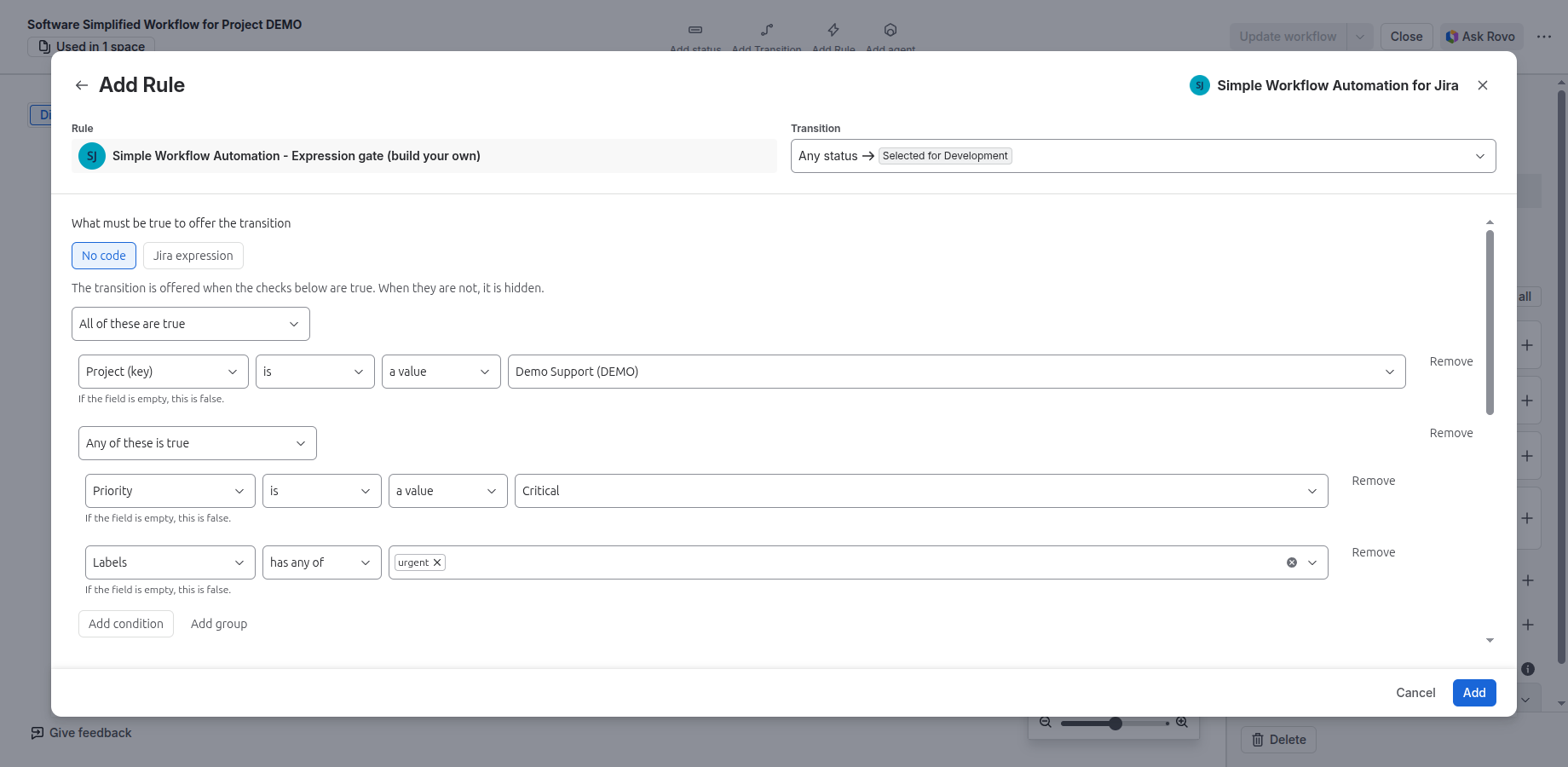
The no-code builder takes a field, an operator and a value per row. Group rows with All, Any, None or Not all, and nest the groups. Each row says what an empty field does.
Try it before it touches work
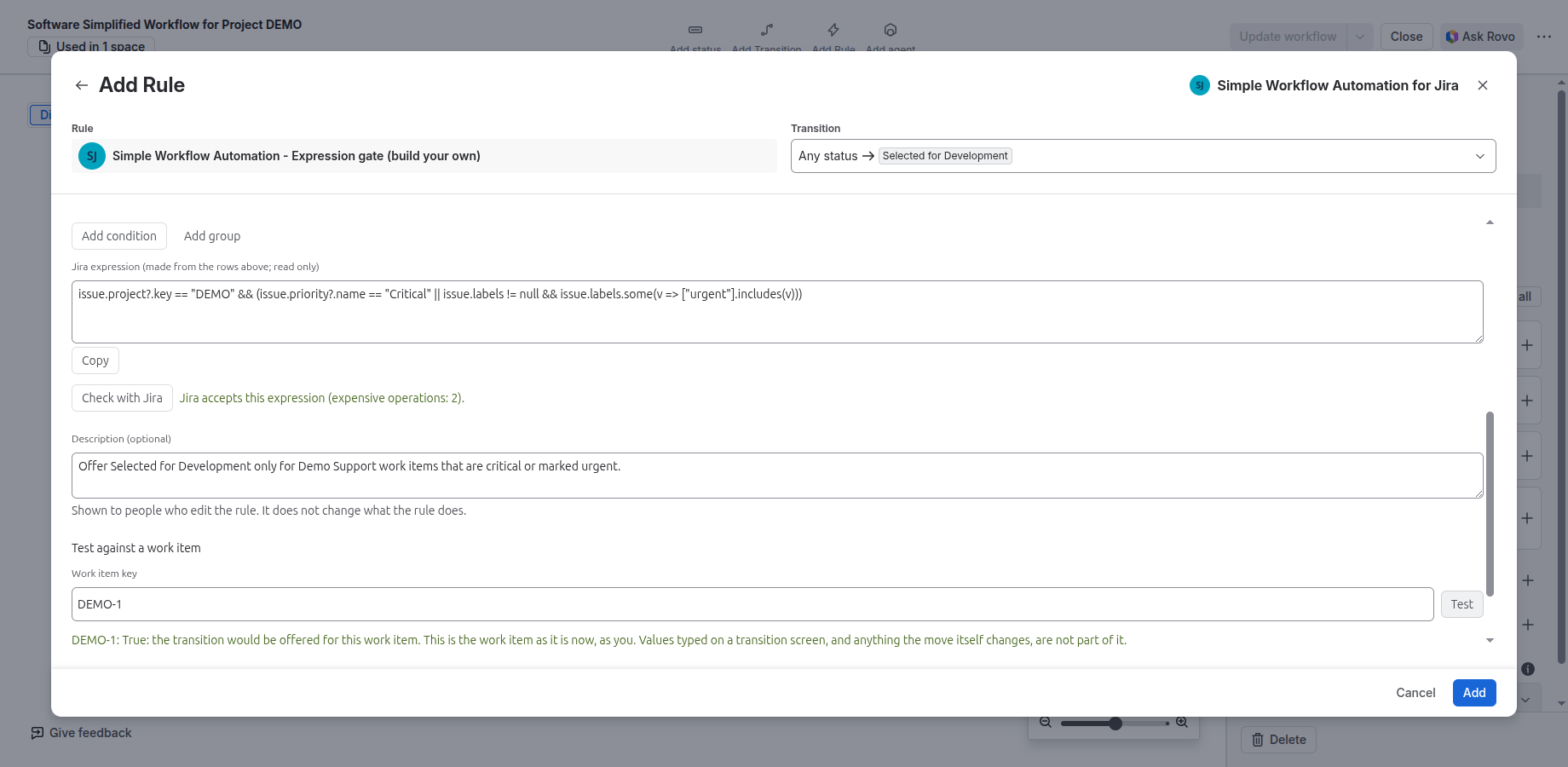
Several rule screens have Test a rule: pick a work item and see what the rule would do, with nothing saved. Scheduled actions have a dry run that changes nothing.
See what happened, and why
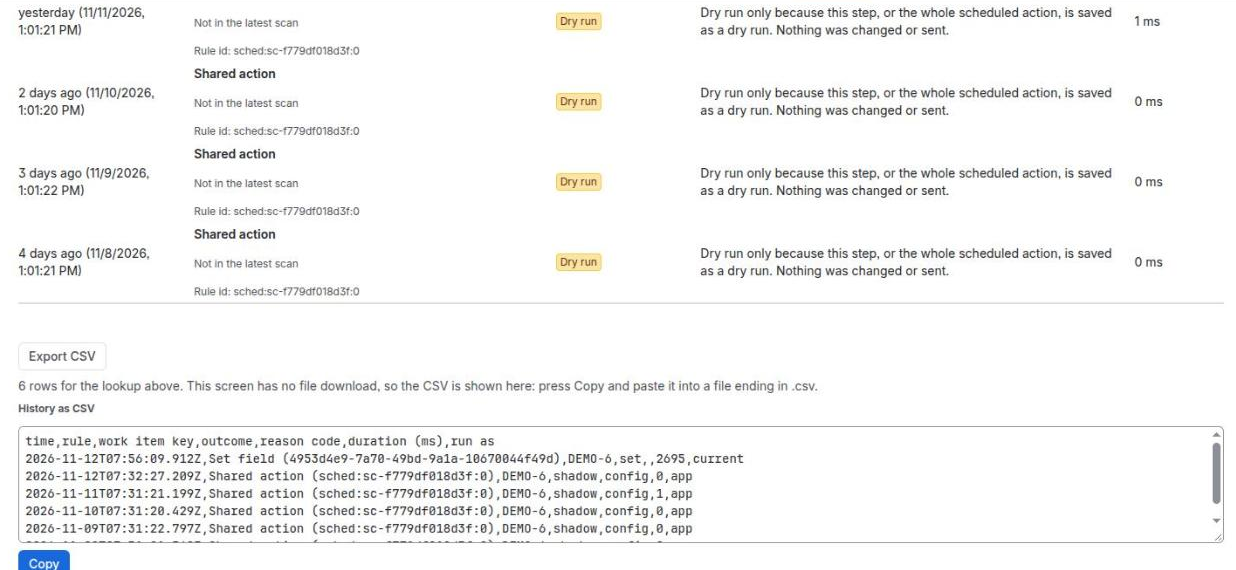
Run history lists each run with the rule, the time, how long it took and a plain reason. Export it to CSV, up to 5,000 rows.
Switch one rule off
Each rule has its own on and off switch. Turn a rule off while you check it, without deleting it or editing the workflow.
Every rule in one place
The admin page lists every rule across your workflows. Rule change history shows who changed which rule, and when.
Choose who an action runs as
Most post-functions, and event and scheduled actions, let you choose who they run as: the app, a named person, or the person who made the move or caused the event. When an action runs as a person, Jira checks that person’s permissions.
Company-managed and team-managed
Rules work in company-managed projects and in team-managed projects. A few rule types are not offered on team-managed projects, and the screen lists them.
Runs on Atlassian Forge
The app runs on Atlassian Forge. Its settings and run history are kept in Forge storage on Atlassian.
In Jira
What Simple Workflow Automation looks like
Screenshots use a demo Jira site and made-up work items.
Features
Simple Workflow Automation features
Conditions
Show a transition only when the work item is in chosen statuses, linked work items pass a test, the person is in chosen users, groups or roles, or the time is inside a window. Or build your own with rows.
Validators
Refuse a move until fields are filled in, a comment or attachment is added, a field matches a pattern, a date compares as it should, a field changed, a checklist is complete, or a search finds few enough work items.
Post-functions
Set, clear and copy fields, move work items, comment, create, assign, link and unlink, log work, set labels, components, watchers or security level, copy comments with their images and files, show a message, and run several steps in order.
Event-based actions
Run actions when something happens in Jira, not only on a transition: work item, version, sprint and project events. Each event action runs a shared action.
Scheduled actions
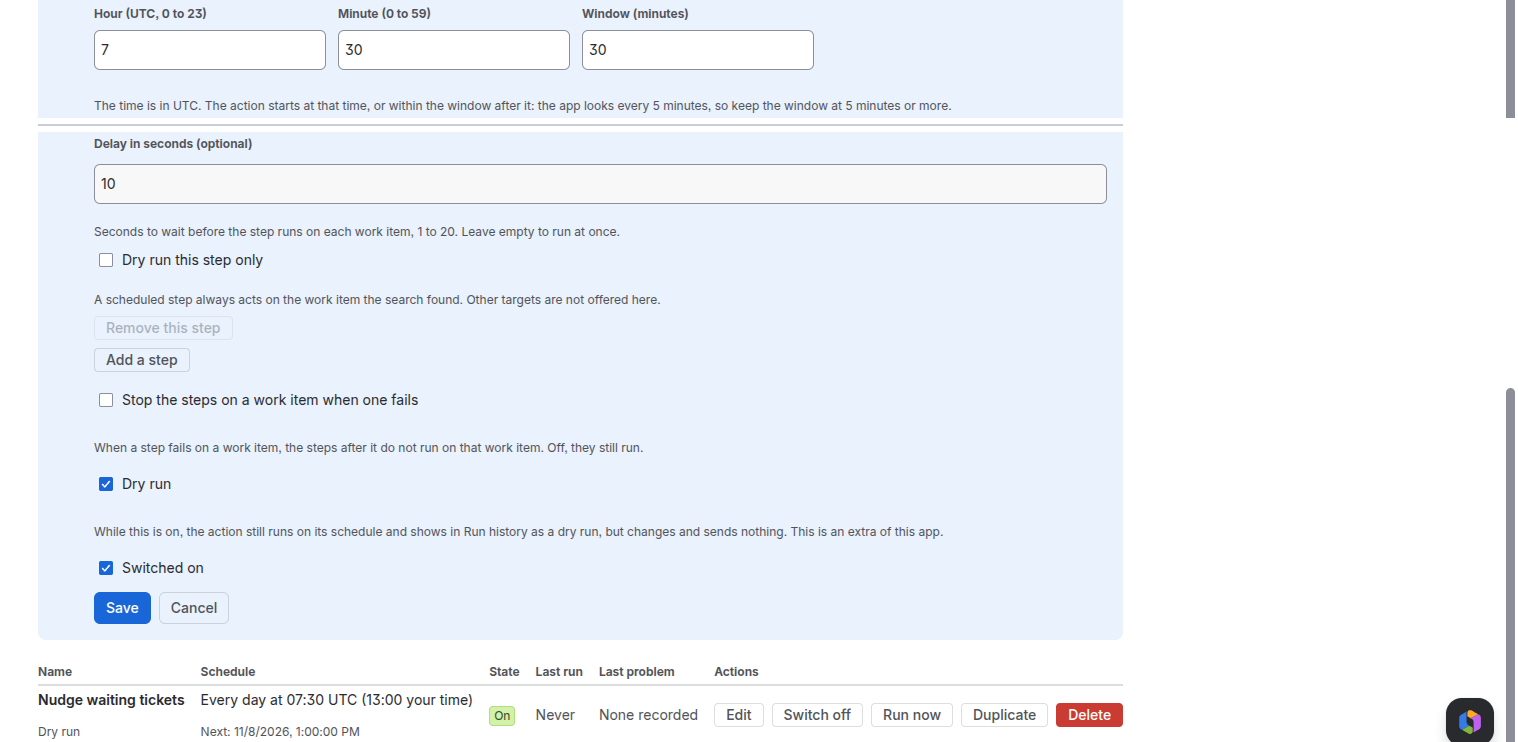
Run actions on a schedule against the work items a search finds, with a time window, a delay, a dry run and a limit on how many work items one run handles.
Shared actions
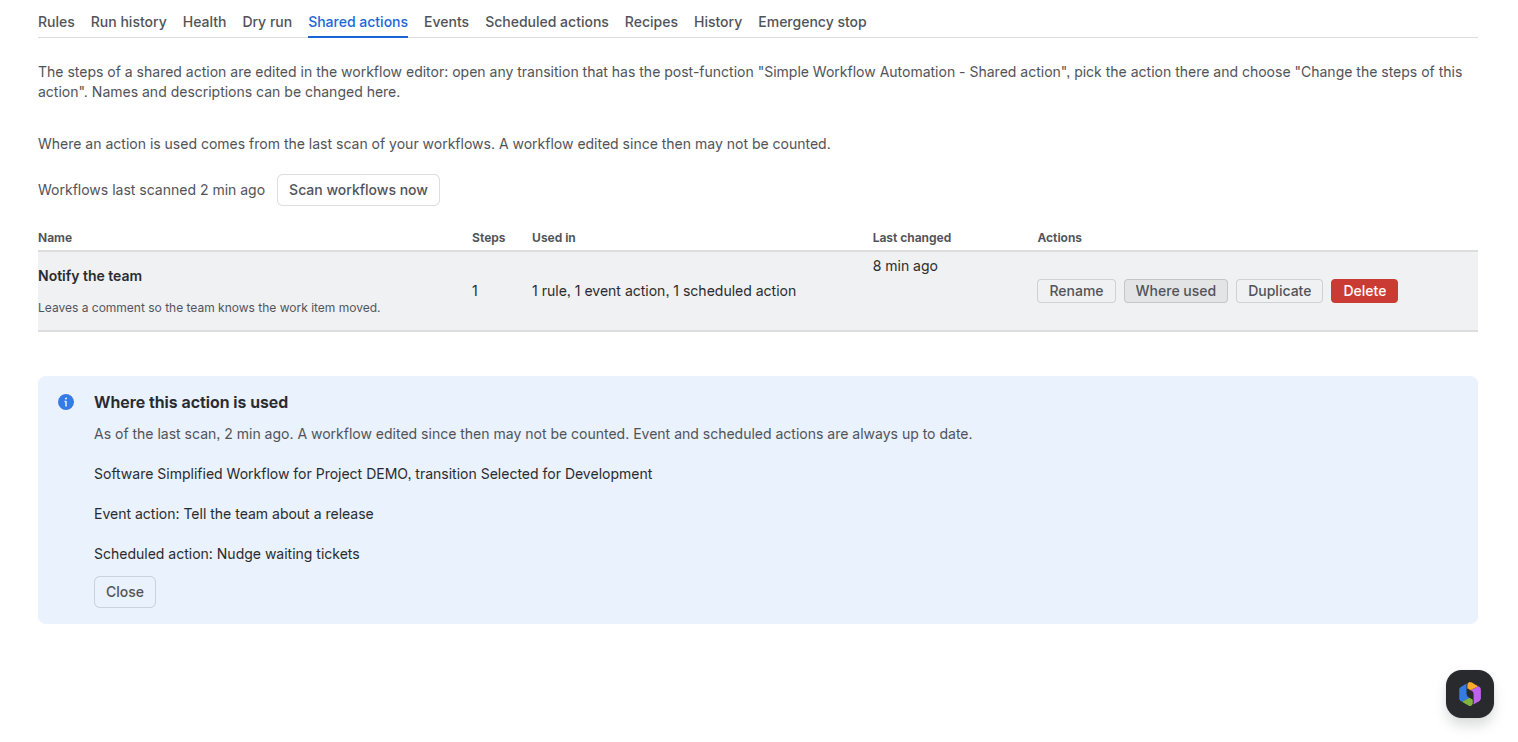
Define a set of steps once and use it from post-functions, event actions and scheduled actions. Change it in one place.
Send an email when work moves, to users and groups, with a text or HTML body. On sites with Jira Service Management, you can also type plain email addresses; people who hide their address from apps are skipped, with a reason in run history.
Copy, export and apply rules
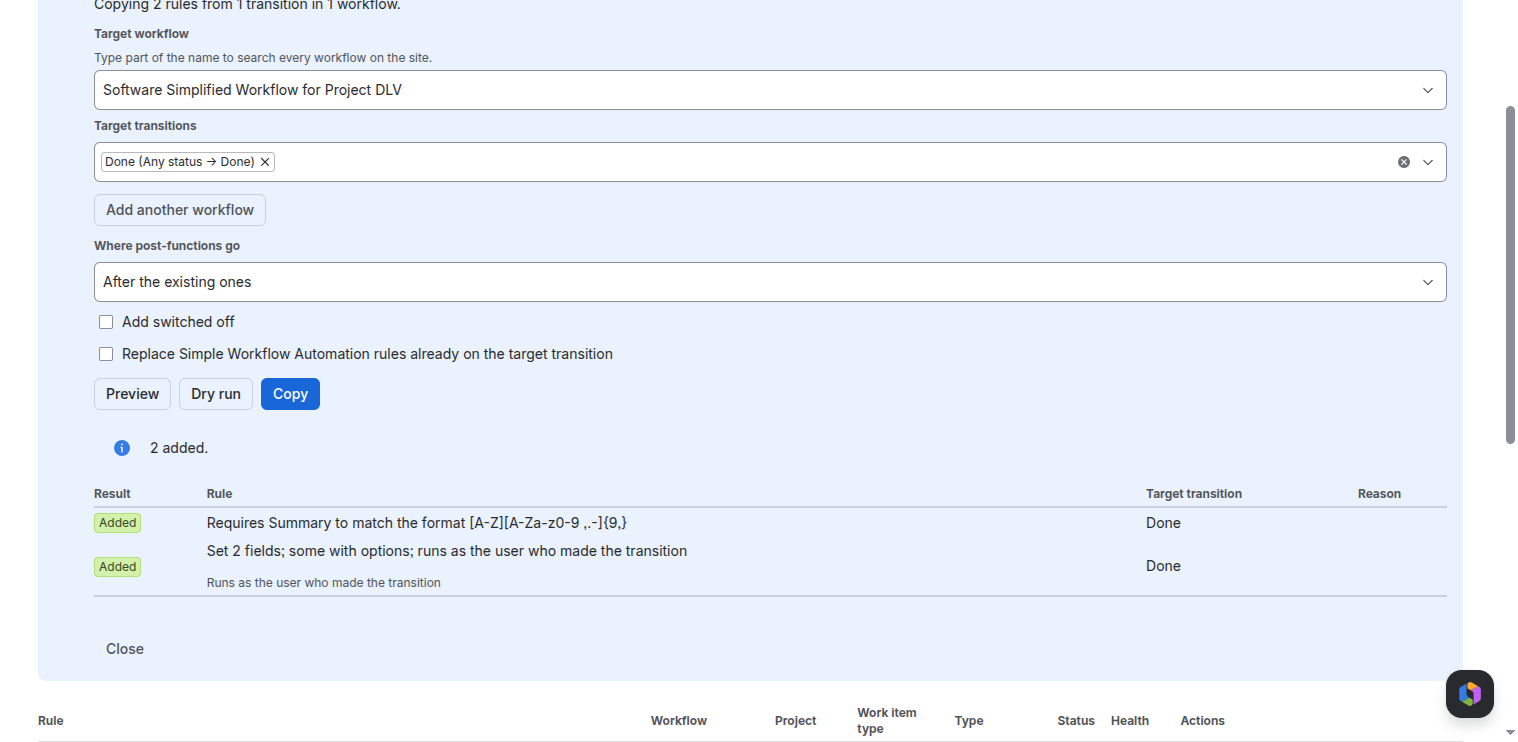
Copy rules to other transitions and workflows, or export them as text and apply them elsewhere. Jira checks each change before it is written, and rules that are already there are left as they are.
Setup
Setup in three steps
Install the app
A Jira admin installs Simple Workflow Automation on a Jira Cloud site.
Add a rule to a transition
In Jira’s workflow editor, add a Simple Workflow Automation condition, validator or post-function and fill in its screen.
Test it, then watch it run
Test the rule on a work item, then follow each run in run history on the app’s admin page.
Resources
Documentation, status and trust
Documentation
How to set up each rule and action, and what to expect when it runs.
Trust
Architecture, data in Forge storage, scopes, run as and retention.
Status
Atlassian’s Jira and Forge status, and how to report a problem.
Privacy policy
What the app reads and keeps, and for how long.
Terms of service
The end-user agreement: the licence, your data, support and liability.
Accessibility
What is built in, and what has not been evaluated yet.
Contact support
Questions, problems or a demo: get in touch.
Raise a ticket
Open a request on the Limbus Lab service desk.
Questions
Common questions about Simple Workflow Automation
What is Simple Workflow Automation?
A Forge app for Jira Cloud. It adds workflow conditions, validators and post-functions, plus event-based, scheduled and shared actions. Jira admins set it up on screens in Jira’s workflow editor and on the app’s admin page.
Do I need to write code?
No. Each rule has its own screen, and the no-code builder covers conditions and validators by field, operator and value, grouped with All, Any, None or Not all.
Whose permissions apply when a rule runs?
Most post-functions, and event and scheduled actions, let you choose who they run as: the app, a named person, or the person who made the move or caused the event. When an action runs as a person, Jira checks that person’s permissions.
Can I try a rule without changing work?
Yes. Several rule screens have Test a rule, which shows what the rule would do on a work item with nothing saved. Scheduled actions have a dry run. And any rule can be switched off on its own without editing the workflow.
How do I see what a rule did?
Run history on the app’s admin page lists each run with the rule, the time, how long it took and a plain reason. You can export it to CSV, up to 5,000 rows. Rule change history shows who changed which rule.
Does it work in team-managed projects?
Yes. A few rule types are not offered there, such as the search-count validator, sequences and shared actions, and the screen lists which.
Is Simple Workflow Automation free?
No. It is a paid app, coming to the Atlassian Marketplace. Atlassian will handle billing. If the subscription ends, workflow actions stop running, while conditions and validators let transitions through. Your rule settings are kept.
How do I install it?
Simple Workflow Automation is coming to the Atlassian Marketplace. Once it is listed, a Jira admin installs it from the Marketplace.
More answers: Simple Workflow Automation help centre FAQ, or ask us.
Simple Workflow Automation demos
We show Simple Workflow Automation on a demo site. Write to us to arrange one.