Jira Forge app · Integrations
Hooq for Jira.
Jira to Jira sync with nothing in the middle.


Keep work items in sync between two Jira Cloud instances, or inside one instance. Fields, comments, attachments and statuses stay up to date, and your administrators stay in control.
No middleware server. Instance A to Instance B. Nothing in the middle.
Why teams choose Hooq
Instance A to Instance B. Nothing in the middle.
Some sync apps pass your work items through a server run by the app’s vendor. Hooq doesn’t have one. Two Hooqs talk to each other directly, and every request is signed and verified by the receiving instance.
Hooq has no server, database or storage of its own, and Limbus Lab operates nothing that your data passes through. The signed request travels over Atlassian’s platform to the other Hooq’s own Forge-hosted address on an Atlassian domain, and both ends run on Atlassian Forge. The Trust Center shows the architecture diagram and the list of outbound domains. See the architecture.
Your data stays on Atlassian
Hooq runs entirely on Atlassian Forge. Its data is kept in Forge storage provisioned for each Jira installation, plus Jira itself. Hooq’s subprocessor is Atlassian (Forge hosting, storage and logs).
Pairing done by two administrators
Two administrators pair their instances with small files they can read. The shared secret is exchanged with public-key cryptography (RSA-2048), requests are signed (HMAC-SHA256) with a timestamp and a one-time number, repeated requests are refused, and the secret is replaced each time a connector is activated.
The receiver does not trust the sender blindly
A paired instance can only touch the Hooq’s own project. It cannot rewrite the connection, cannot adopt new project keys, and can only set a short list of allowed statuses.
Administrators decide
Setting up, publishing and starting a Hooq is for Jira administrators. Changes are saved as a draft and a Hooq works from its published configuration, so nothing changes for your teams until you publish. Between two instances, the other instance approves the Hooq request.
Inline images and files stay where they were
Images and files shown inside descriptions and comments appear in the copy in the same place as in the original, on one instance and between two, carried with a signed media reference so the right file lands in the right slot. Between two instances a file can be up to about 3.5 MB.
A person’s edit is not silently overwritten
If a person edits the copy within about 2 seconds after the original changed, their edit is kept and older text does not replace it. A Resync does not replace an edit made less than a minute earlier.
The work item panel tells people what they need
Each synced work item shows its partner, the partner’s status, assignee and reporter, the Hooq status, when it last sent and received, and buttons for Resync, Comment and Attachment. If the partner is deleted or changes work type, the panel is locked and says why.
Parents, teams, sprints and boards
The Parent of the copy follows the copy of the new parent (inside one Hooq), and a text field can set the Parent. Teams are mapped when a Team field is mapped, a work item joins the matching sprint on the other side, boards are created and deleted on the partner (not cloned, renames are not synced), and sprint events are mirrored.
Failures reach the right people
Two notification events (complete failure and individual work item failure) tell users, groups, project roles and e-mail addresses per project. A failure on the receiving instance also appears in the sender’s Troubleshooting tab.
Built to cope with bursts
When the platform throttles storage during a burst of changes, Hooq asks the platform to retry instead of dropping the change. In a test on a development site with 1,800 edits at 1.5 per second, none were lost; above that rate changes can arrive late.
Checked before each release
Each change comes with automated checks (85 check scripts as of October 2026) and live test records, and releases are tested on a staging environment first.
Limits and status in the open
The limits are written in the help centre under “What to expect”, the current service status is on a public page, and the Trust Center covers security, privacy and data handling.
More detail: Jira to Jira sync apps compared.
See it in action
Watch how Hooq works.
In Jira
What Hooq looks like.
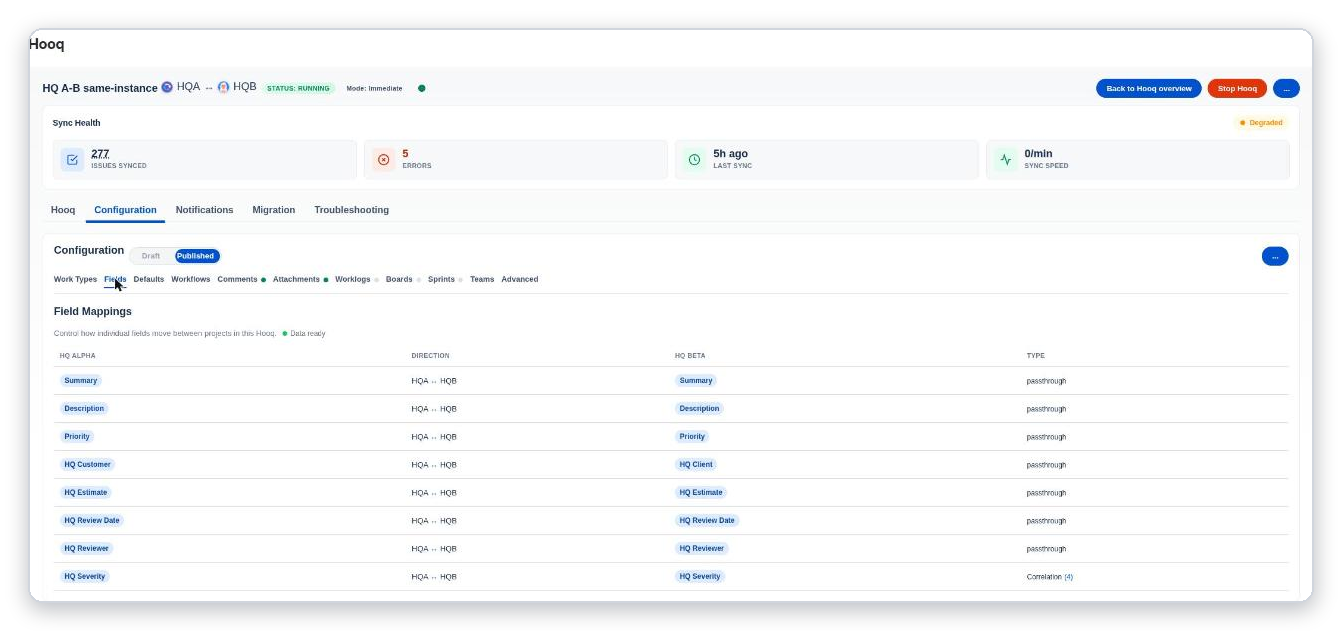
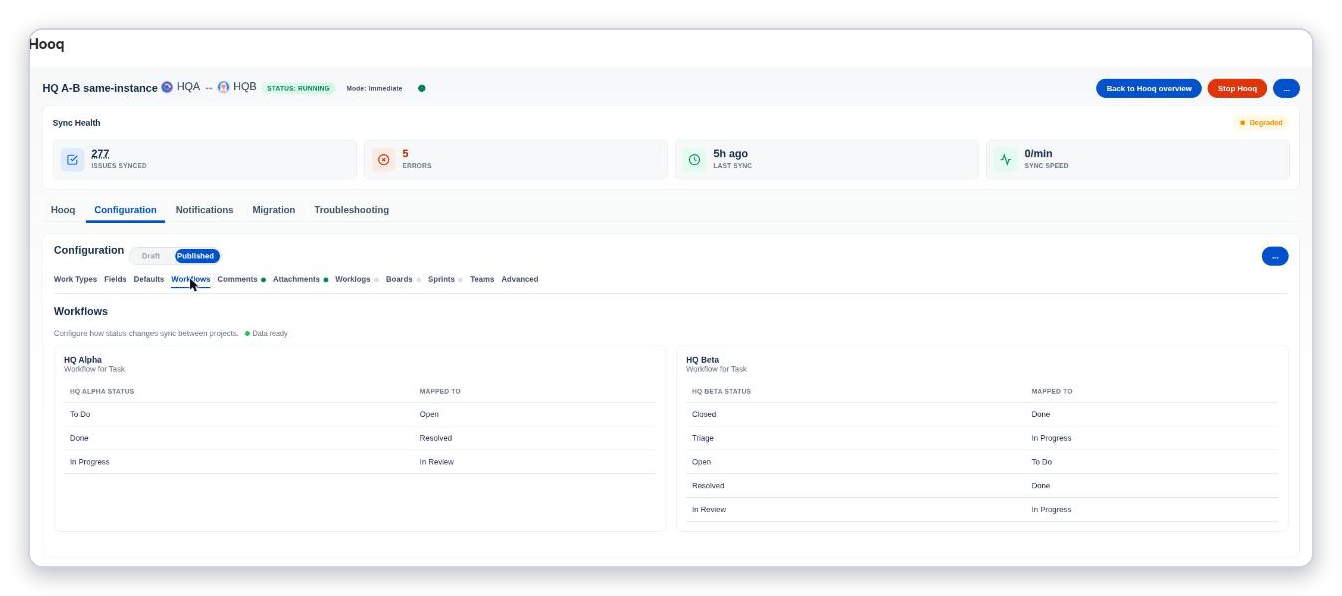
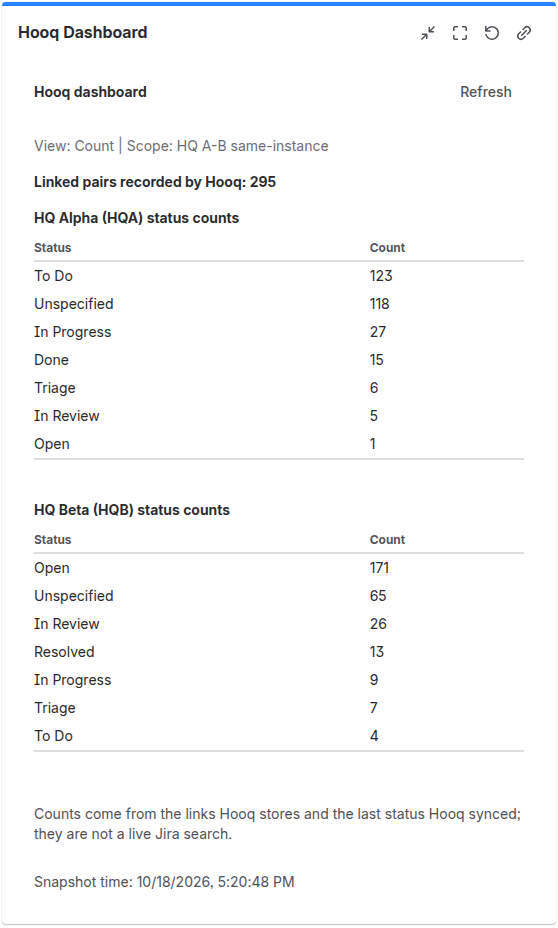
Features
Everything you need to keep work items in sync.
Two sites, one source of truth
Keep work items in sync between two Jira Cloud sites, or between projects inside one site. Fields and values, comments, attachments, statuses and transitions follow the original.
Files and inline images, exactly as written
Images and files shown inside descriptions and comments appear in the copy in the same place as in the original. Between two sites, files can be up to 3.5 MB.
People stay in control
Only Jira administrators set up and publish a sync. If someone edits the copy, their edit is kept and is not replaced by older text.
Troubleshoot from Jira
An issue panel shows the sync status of every work item and offers Resync. A Troubleshooting tab lists errors.
Setup
Up and running in three steps.
Connect your Jira sites
Between two Jira Cloud sites, create a connector and approve it on both sides. Requests between the sites are signed. Inside one site no connector is needed.
Create a Hooq
Choose the projects, then pick work types, fields and defaults. Setup is admin-only.
Publish and start
Work items start to sync. Check any work item on its issue panel, and use Resync to send it again.
Resources
Documentation, status and trust.
Questions to ask any Jira to Jira sync app
Fifty-seven plain buyer questions in six groups, each with the answer for Hooq.
Jira to Jira sync apps compared
What to look for in a Jira to Jira sync app, with plain answers about Hooq.
Documentation
Guides for setting up and using Hooq.
Status
Current service and platform status.
Trust
Security, privacy and compliance information.
Privacy policy
How Hooq handles your data.
Accessibility report
How accessible Hooq is, with ratings and what is not yet evaluated.
Contact support
Questions, problems or a ticket: get in touch.
Atlassian Marketplace
View the Hooq listing and install the app.
Also in preview: Hooq for ServiceNow
Hooq (Advanced Edition) for Jira
Connects Jira with ServiceNow, Azure DevOps and GitHub. Coming soon.
Features coming soon
- Connect Jira Cloud with ServiceNow, with changes going both ways
- Connect Jira Cloud with GitHub
- Connect Jira Cloud with Azure DevOps
- Set it up the way you already know: connect, choose what syncs, publish and start
- Both sides keep the same published settings
Questions
Common questions about Hooq.
What is Hooq?
Hooq - Secure Work Item Sync for Jira is an Atlassian Forge app for Jira Cloud. It copies work items between two Jira projects and keeps the copies up to date. The two projects can be on the same Jira Cloud instance or on two different Jira Cloud instances.
Why choose Hooq for Jira to Jira sync?
Teams choose Hooq because of how it is built and how much it leaves in their hands. It sends changes straight from the Hooq on one instance to the Hooq on the other, with no relay or middleware server in between. It runs entirely on Atlassian Forge, so data stays in each customer’s Forge storage and Jira. Setting up, publishing and starting it is for Jira administrators, and administrators on both instances take part in a connection. Requests between instances are signed and verified by the receiving instance. It works between two instances and inside one, copies fields, statuses, comments and attachments including inline images and files, keeps a person’s edit instead of overwriting it with older text, and shows status, Resync and errors inside Jira. Two administrators pair the instances with a public-key exchange, the receiving instance limits what a paired instance may do, and a work item panel shows the partner, its status and a locked state with the reason if the partner is deleted or changes work type. Parent, team, sprint and board relationships follow the copy, failures reach the people you choose, and the app retries through the platform during bursts. Its limits are documented and its status page is public.
Does Hooq use a middleware or relay server?
No. A cross-instance Hooq sends a signed request straight to the other Hooq’s own Forge-hosted address on an Atlassian domain, and the receiving instance verifies it before it acts. There is no server, database or storage operated by Limbus Lab in between.
Can Jira sync between two instances without a third-party server?
With Hooq, yes. Hooq runs entirely on Atlassian Forge and does not operate any server, database or storage of its own. Between two instances, Hooq on one instance sends a signed request to Hooq on the other, and the other instance checks it before it acts.
What does Hooq sync?
Work items of the work types you match, the fields you map, statuses you match in the Workflows tab, comments, worklogs, and attachments, including images and files shown inside descriptions and comments. Fields you did not map are not copied.
Does Hooq copy worklogs, and can a restricted worklog become public?
Yes, when the Worklogs tab is on. The copy carries the time, the start time, the comment and the visibility of the original, either without the author (Anonymous) or with a first line that names who logged the time (Enriched). Hooq never makes a restricted worklog public: a worklog restricted to a project role is copied only when the Hooq user is a member of that role in the project of the original. Edits of an existing worklog are not synced.
Do I need a connector?
Only between two different Jira Cloud instances. A connector is the trusted link between the Hooq on your instance and the Hooq on the other one, and it must show the status Active before you can use it. Between two projects on one instance no connector is needed.
I already use another sync app. Can I switch to Hooq without starting over?
Yes. You set up and test a Hooq, pause the other app, and use Manual Link to tell Hooq which work items already belong together. Hooq links each pair and copies nothing; only changes made after the link sync. Running Manual Link on one instance is enough, and afterwards you can switch off the other app.
Who can set up a Hooq?
Jira administrators. Everyone who can see a work item can use the Hooq panel on it to check the sync status, resync, add a comment or add an attachment.
What happens if someone edits the copy?
A person’s edit on the copy is kept. If they edit within about 2 seconds after the original changed, or right after a Resync, Hooq does not replace their text with older text.
Does Hooq delete work items?
No. If you delete the original, the copy stays and its panel says the pair is no longer Hooqed. Comments can be different: with Prevent Comment Deletion off in the Advanced tab, deleting an original comment deletes its copy, and deleting a copy never deletes the original.
Where can I find help?
The Hooq help centre has set-up guides, how-to guides, an FAQ, troubleshooting and release notes. The Trust Center describes security, privacy and data handling.
More answers: Hooq help centre FAQ and Jira to Jira sync apps compared.
Hooq
Ready to sync work items across Jira?
Get in touch and we'll set up a live demo of Hooq for your Jira sites.