

A shared action is a named list of steps used by many transitions. Change it in one place and every rule that uses it follows from its next run.
Make one
- In Jira’s workflow editor, open a transition and add the post-function Simple Workflow Automation - Shared action.
- Choose Create a shared action, name it and add steps. Steps are any of the post-functions, set up on their own screens, and a call to another shared action.
- Back on the rule, choose it in Shared action to run, pick which work items it runs on, and save.
To change the steps later, choose Change the steps of this action on any rule that uses it.
Where it is used
- The Shared action post-function on any number of transitions.
- Event-based actions and scheduled actions.
- Other shared actions. An action that would call itself is refused.
The Shared actions tab
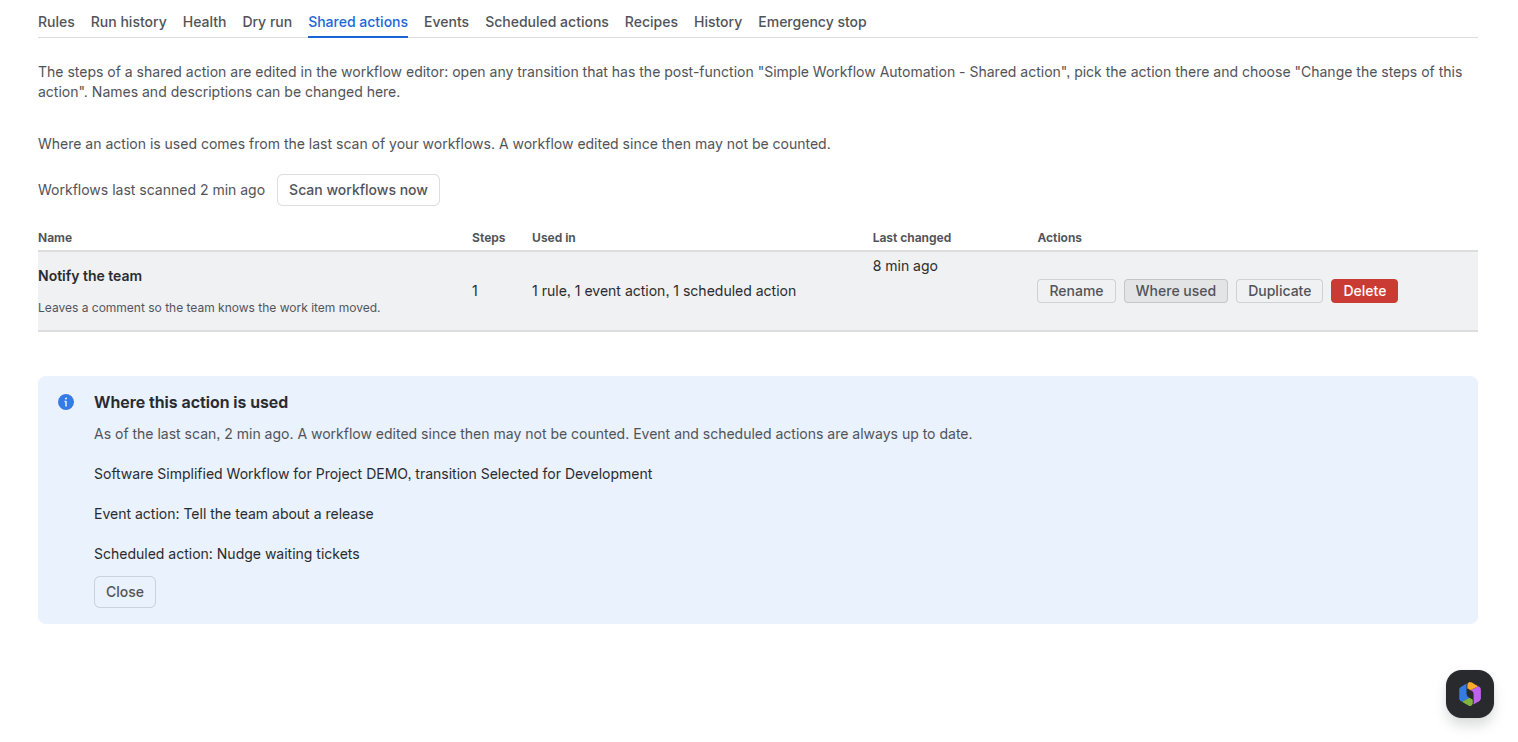
- Lists each action with its steps, where it is used and when it last changed. Rename, Where used, Duplicate and Delete.
- Where used comes from the last workflow scan; Scan workflows now refreshes it. An action still in use cannot be deleted.
- After a rename, rules keep showing the old name in the workflow editor until they are saved again.
What to expect
- A run reads the steps as they are at that moment. A run already queued keeps the steps it started with.
- The steps of one action can take up to 80 KB.
- If the action has been deleted, the rule runs nothing and never blocks the move.
- Shared actions are for company-managed projects only, and refuse to run on a team-managed one.
Related pages
Need help with Simple Workflow Automation? Contact us