

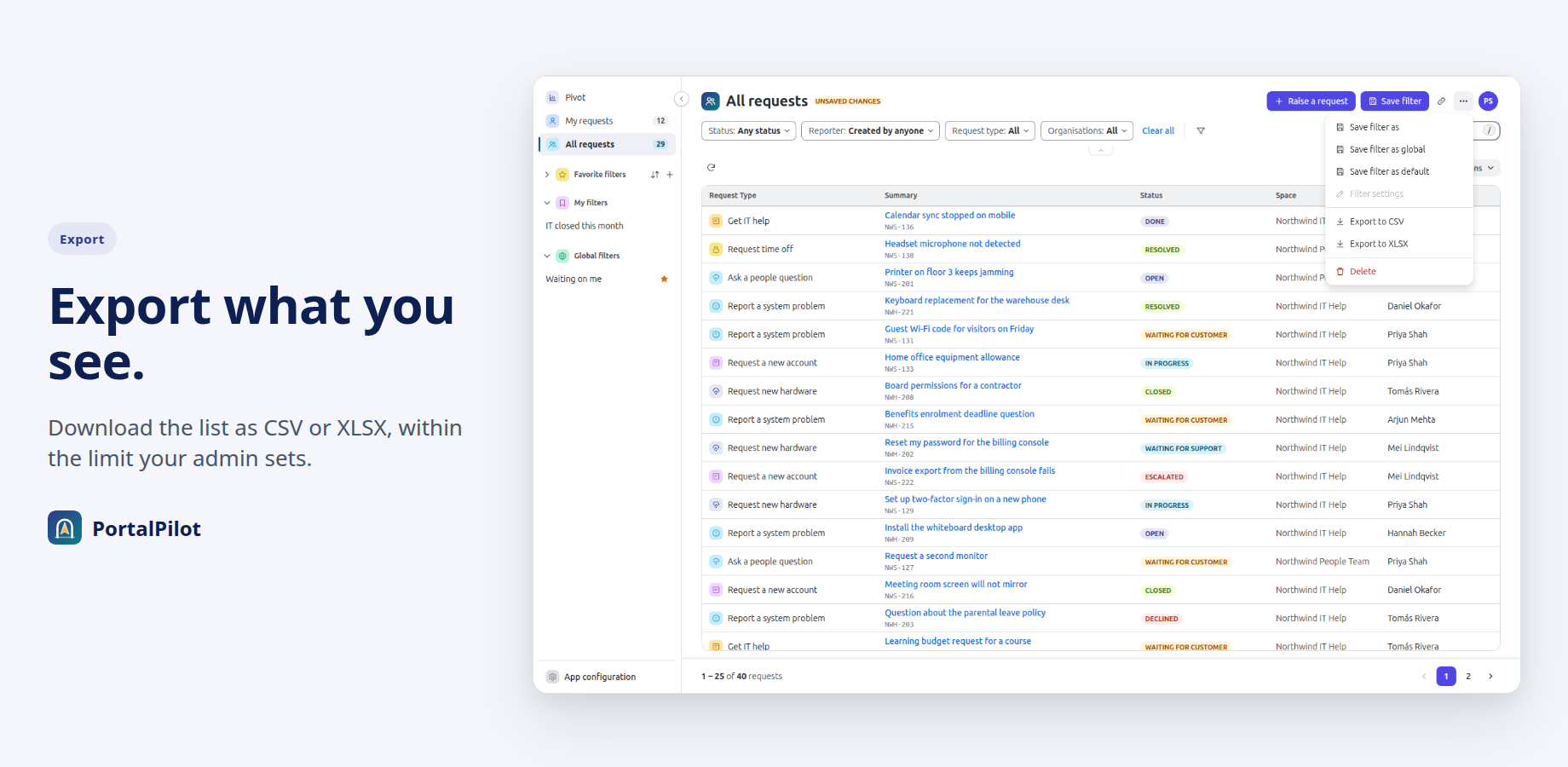
A customer who wants their Jira Service Management requests in a spreadsheet needs a file of that list, and the admin needs to know what that file can hold. PortalPilot, an app coming to the Atlassian Marketplace, adds export to CSV and XLSX to a full-screen request list on the portal. This post shows how a customer exports, what the file holds, and which controls an admin has.
Who can export#
Any customer who can open PortalPilot can export (see Export requests), as long as the admin has left export on. Export is on by default. There is no per-person setting for export itself. Who can open PortalPilot is set on the Visibility tab of General settings, and the Can't access list always wins over the Can access list.
What the file contains#
- The columns on screen, in the same order, and the requests in the list's sort order.
- The filters in use. If you filter to one status, the file holds that status.
- Only requests Jira lets that person see. PortalPilot reads every request as the signed-in customer, never as the app (What to expect), so Jira applies portal permissions and work item security levels. No setting changes this.
- Up to the export limit the admin sets, and never more than 1,000 requests.
If more requests match than the limit allows, the export stops at the limit and the message says some requests are not included. A very wide view can stop early with the same message.
The Created column uses the Date/Time format chosen in the dialog, in the browser's time zone. The file is named portalpilot-YYYY-MM-DD.csv or portalpilot-YYYY-MM-DD.xlsx, using the UTC date.
CSV or XLSX#
Both formats hold the same table. They differ in how a spreadsheet treats them.
- CSV is plain text. The dialog offers a delimiter: Comma (,), Semicolon (;), Tab or Pipe (|). The default is Comma (,).
- XLSX is one sheet named Requests. Every cell is stored as text. The file contains no formulas, so a spreadsheet has nothing to calculate when it opens the file.
Protection against formula injection#
A spreadsheet can run a cell as a formula when its text starts with a certain character. A request summary is typed by a customer, so it could start with one.
- In CSV, a cell that starts with =, +, -, @, a tab, a carriage return or a pipe gets a single quote added in front. The spreadsheet then shows it as text.
- In XLSX, no cell is ever written as a formula, so the same value stays text.
PortalPilot's unit tests cover both cases.
Where the file is built#
The list is read from Jira on Atlassian's Forge platform (How PortalPilot works, Permissions and data), and the file is built in the customer's browser from the rows Jira returned. The browser then saves it to the customer's device.
- All Jira reads run as the signed-in person. The app contains no call that runs as the app itself.
- The app's manifest lists no outside address, no remote and no web trigger. The app cannot send data to a host outside Atlassian.
- PortalPilot does not store request content. It keeps settings and saved filters in Forge storage and reads requests from Jira each time.
Export a list as a customer#
- Open PortalPilot from the banner on the portal's Requests page.
- Choose My requests or All requests.
- Set up the filters, columns and sort you want.
- Open the "..." menu and choose Export to CSV or Export to XLSX.
- In the dialog, choose the Date/Time format and, for CSV, the delimiter.
- Select Export. A message shows while the file is prepared, and large exports can take longer.
If the browser blocks the download, the message offers Save exported file and, for CSV, Copy as CSV.
Set the limit or turn export off as an admin#
- In Jira, open Jira settings, then Apps, then PortalPilot, then General settings.
- Open the Export tab.
- To turn export off, turn off Allow customers to export requests. The Export to CSV and Export to XLSX items leave the "..." menu, and the server refuses export requests.
- To lower the cap, enter a whole number from 1 to 1,000 in Maximum number of requests per export. The default is 1,000.
- Select Save changes.
Settings are one set for the whole site, so a saved change applies to every customer. Customers see it the next time they load the portal page or open PortalPilot. Export is also checked on the server for every request. If an admin turns export off while a customer has PortalPilot open, the export fails with the message "Export is turned off by your administrator."
A lower limit keeps files small and waiting times short, because each export reads up to that many requests before the file is built.
The 1,000-request limit#
Lists, counts and exports in PortalPilot work on up to 1,000 matching requests, the most recently active first. The export limit sits inside that: the admin can lower it, not raise it. The limit never lets a restricted request through, because Jira decides what each person may see before the list is built.
Summary#
- Export is on by default and an admin can turn it off for the whole site.
- The file holds the columns and filters on screen, up to the admin's cap of 1 to 1,000 requests.
- Each request is read as the signed-in customer, so the file holds only what that customer may see.
- CSV cells that could run as formulas are prefixed with a quote, and XLSX cells are all text.
- The file is built in the browser, and the app declares no outside address.


